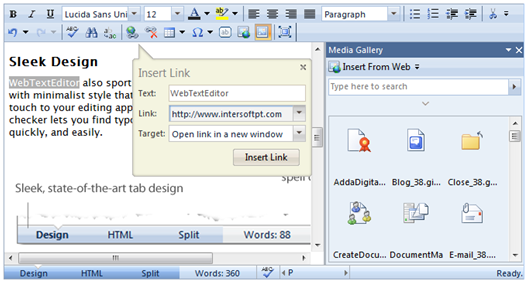
All elements in WebTextEditor have been carefully designed to be lightweight and minimalist style, yet providing powerful editing experience. The main header contains editor toolbar, which can seamlessly adjust itself to the container size and easily hidden when user needs more space for editing. The main footer can be used for view switching, navigating through layout structure, and status bar.
Most text editor components in the market still used old-fashioned dialog box interface for user input, such as input for images, hyperlink, tables, etc - which is less intuitive because of the "blocking" nature of the dialog box interface. WebTextEditor advances editing experience with a better, more intuitive approach. Called "block-less" user interface concept, WebTextEditor supports modern, lightweight callout and task pane for user interactions, which ultimately provides user with more intuitive way to work and interact with input fields and objects.